> ## Documentation Index
> Fetch the complete documentation index at: https://docs.yirenova.com/llms.txt
> Use this file to discover all available pages before exploring further.
# 红外接收发射模块
## ⭐ 简介
**📥 接收端**
HX1838是一款广泛应用于红外遥控领域的红外接收模块,属于一体化红外接收器。该模块由一个红外光电二极管、前置放大器和解调电路组成,能够接收并解调红外遥控器发射的38kHz载波信号。它具有高灵敏度、低功耗、抗干扰能力强等优点,适用于各类家用电器、智能控制系统和工业设备中的红外遥控接收部分。
**📤 发送端**
IR940 红外LED 是一款低功耗,插件式外型封装的二极管,它具有发射功率强、受光角度均匀等优点。
**🗄️ 遥控器**
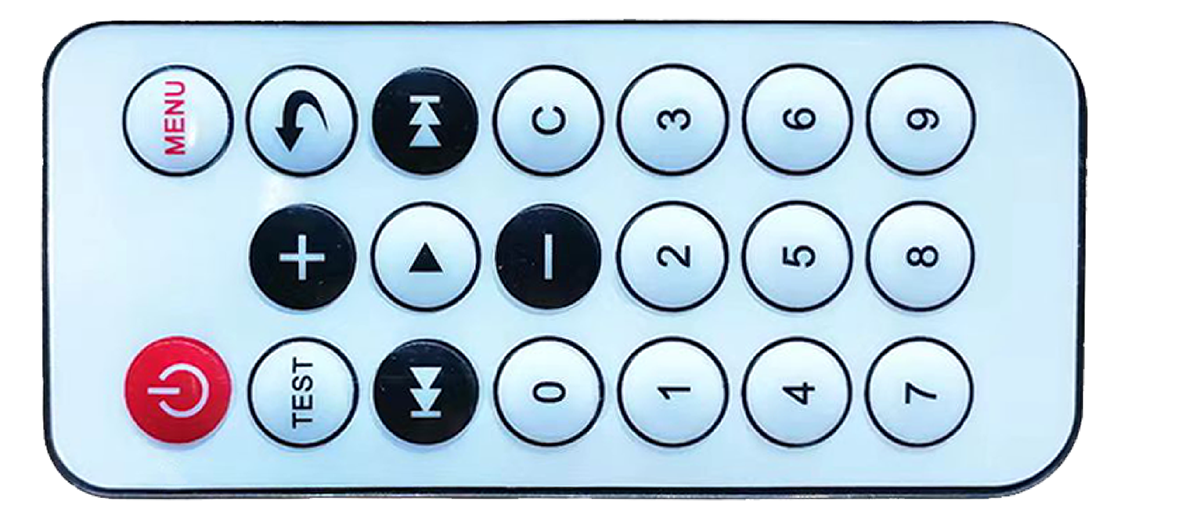
遥控器通过NEC协议的方式发送特定的红外光波,NEC协议通过发射特定的38Khz载波,采用脉冲形式进行编码与设备通讯,达到控制设备的目的。
#### ⭐ 参数
* 📥接收端参数
* 工作温度:-20 \~ 85℃
* 工作电压:2.7V \~ 5.5V
* 工作电流:0.8mA
* 接收角度:±45°
* 响应时间:≈1ms
* 📤接收端
* 工作温度:-40 \~ 85℃
* 工作电压:5V
* 工作电流:100mA
* 发射视角:32°
* 发射波长:940nm
* 🗄️ 遥控器
* 发射距离:Max 8m
* 发射频率:38Khz
* 按键数量:20键
* 编码:NEC格式, udp6122方案
#### ⭐ 接口
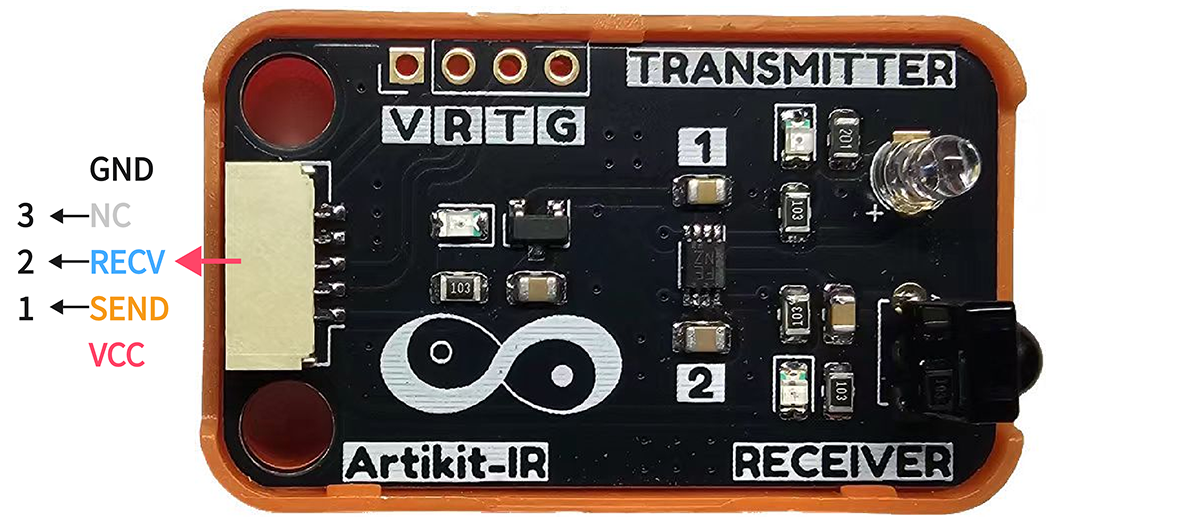 #### ⭐ 模块尺寸
* 📐 24mm x 40mm x 20.5mm
#### ⭐ 模块尺寸
* 📐 24mm x 40mm x 20.5mm
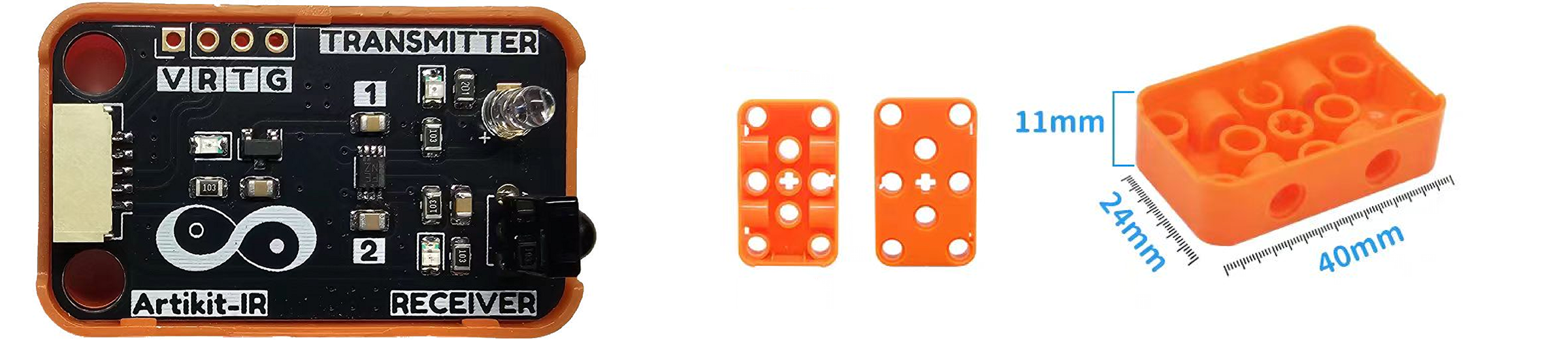 #### ⭐ 遥控器尺寸
* 📐 86mm x 40mm x 6mm
#### ⭐ 遥控器尺寸
* 📐 86mm x 40mm x 6mm
 ## ⭐ 如何使用
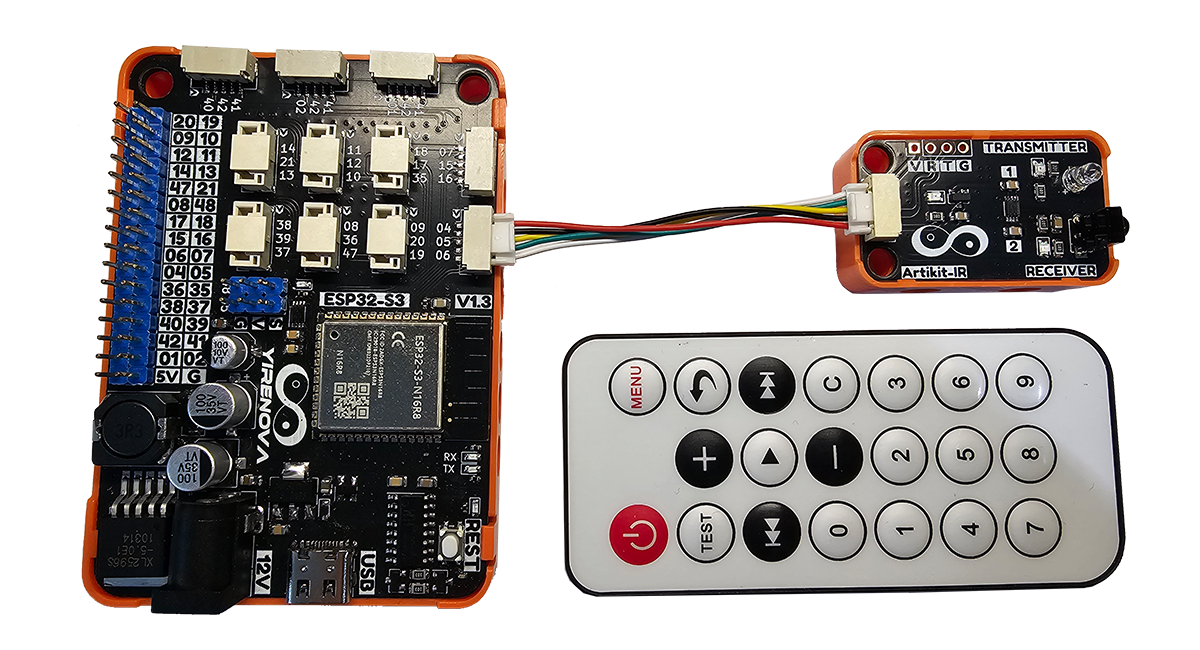
在Artikit-ESP32-S3主控板控制下,通过ir接收端接收遥控器发射的信号,并解析打印在串口监视器中。随后通过ir发射端发送一组确定的指令,再次通过接收端接收自身发射的信号,并且打印在串口监视器中。
#### ⭐ 准备
* 硬件
* Artikit-ESP32-S3主控板 x1
* Artikit-IR模组 x1
* 红外遥控器 x1
* GH1.25连接线 x1
* 12V直流电源 x1
* PC电脑 x1
* 软件
[](https://arduino.cc/en/Main/Software)
* 需要安装 IRremote 库
#### ⭐ 连接图
## ⭐ 如何使用
在Artikit-ESP32-S3主控板控制下,通过ir接收端接收遥控器发射的信号,并解析打印在串口监视器中。随后通过ir发射端发送一组确定的指令,再次通过接收端接收自身发射的信号,并且打印在串口监视器中。
#### ⭐ 准备
* 硬件
* Artikit-ESP32-S3主控板 x1
* Artikit-IR模组 x1
* 红外遥控器 x1
* GH1.25连接线 x1
* 12V直流电源 x1
* PC电脑 x1
* 软件
[](https://arduino.cc/en/Main/Software)
* 需要安装 IRremote 库
#### ⭐ 连接图
 * 打开Arduino的程序编译环境,上传以下代码:
```c++ ir.ino theme={null}
#include
#define IR_SEND_PIN 4
#define IR_RECV_PIN 5
#define SENDING_REPEATS 1 // 信号发送次数
void setup()
{
Serial.begin(115200); // 初始化串口
IrReceiver.begin(IR_RECV_PIN, DISABLE_LED_FEEDBACK);
IrSender.begin(IR_SEND_PIN, ENABLE_LED_FEEDBACK);
}
void loop()
{
if (IrReceiver.decode())
{
Serial.print("Received command: ");
Serial.println(IrReceiver.decodedIRData.command);
IrReceiver.resume();
delay(2000);
if(IrReceiver.decodedIRData.command == 69) // Remote control power button pressed
{
unsigned long code = 0x20DF10EF; // command == 223
Serial.println("Issue a specific NEC instruction: 223");
IrSender.sendNECRaw(code, SENDING_REPEATS);
}
}
delay(100);
}
```
在Arduino IDE串口监视器可以查看到NEC红外遥控指令解析的情况,当按键为电源键时,设备通过IR发射指令为223红外指令信号。
* 打开Arduino的程序编译环境,上传以下代码:
```c++ ir.ino theme={null}
#include
#define IR_SEND_PIN 4
#define IR_RECV_PIN 5
#define SENDING_REPEATS 1 // 信号发送次数
void setup()
{
Serial.begin(115200); // 初始化串口
IrReceiver.begin(IR_RECV_PIN, DISABLE_LED_FEEDBACK);
IrSender.begin(IR_SEND_PIN, ENABLE_LED_FEEDBACK);
}
void loop()
{
if (IrReceiver.decode())
{
Serial.print("Received command: ");
Serial.println(IrReceiver.decodedIRData.command);
IrReceiver.resume();
delay(2000);
if(IrReceiver.decodedIRData.command == 69) // Remote control power button pressed
{
unsigned long code = 0x20DF10EF; // command == 223
Serial.println("Issue a specific NEC instruction: 223");
IrSender.sendNECRaw(code, SENDING_REPEATS);
}
}
delay(100);
}
```
在Arduino IDE串口监视器可以查看到NEC红外遥控指令解析的情况,当按键为电源键时,设备通过IR发射指令为223红外指令信号。
 ## ⭐ 其他资料
红外收发模块原理图 [下载](../../public/resources/schematics/ir.pdf)
红外接收传感器数据手册 [下载](../../public/resources/datasheet/HX1813.pdf)
红外发送传感器数据手册 [下载](../../public/resources/datasheet/IR940.pdf)
## ⭐ 其他资料
红外收发模块原理图 [下载](../../public/resources/schematics/ir.pdf)
红外接收传感器数据手册 [下载](../../public/resources/datasheet/HX1813.pdf)
红外发送传感器数据手册 [下载](../../public/resources/datasheet/IR940.pdf)